

[Full-Version] 2021 New TorrentExam PL-100 PDF Recently Updated Questions
PL-100 Exam with Guarantee Updated 128 Questions
Understanding functional and technical aspects of PL-100: Microsoft Power Platform App Maker Certification Identify Requirements Design apps and automate workflows
The following will be discussed in MICROSOFT PL-100 dumps pdf:
- Understand Power Platform environments
- Map problem domain to Power Platform tools
- Collect business requirements
- Describe Common Data Service solutions
- Identify required Power Platform components
- Understand how to get started building apps
- Describe other environment creation options
- Identify opportunities for component reuse
- Design for localization
- Define data output requirements
- Identify required business processes
- Apply user interface (UI) standards
- Design for accessibility
- Create a high-level data model
- Design User Interface
- Identify repositories for analytical data
- Determine required entities
- Evaluate accelerators, Microsoft apps and services, and third-party solutions
- Identify data that must be protected or requires special handling
- Identify relationships
- Determine required Power Apps
- Determine requirements for offline access
NEW QUESTION 35
You need to modify the entity form to resolve the customer request number issue.
What should you do?
- A. Change the data type of the customer request number field to Autonumber
- B. Use a calculated field
- C. Change the data type of the customer request number field to Lookup
Answer: A
Explanation:
Scenario: Users report that the customer request number is difficult to interpret. They request that you change the number to a system generated sequential number.
Autonumber columns are columns that automatically generate alphanumeric strings whenever they are created.
Reference:
https://docs.microsoft.com/en-us/powerapps/maker/data-platform/autonumber-fields
NEW QUESTION 36
You are an app designer for a hotel.
The hotel wants to create an app to help the housekeeping staff schedule work.
You need to create a new environment for the app.
Where should you create the environment?
- A. Power Apps Maker portal
- B. Dynamics 365 Admin center
- C. Power Platform Admin center
Answer: C
Explanation:
Manage environment in the Power Platform admin center.
Reference:
https://docs.microsoft.com/en-us/power-platform/admin/create-environment
NEW QUESTION 37
You are an app maker for a college. You create an app for student enrollment. The app captures the education level of the applicants.
The education level at the time of enrollment is an option set is in the student entity. The entity includes three levels:
High school
College
Bachelor
You must split the College option into two option sets:
College - 1 Year
College - 2 years
The split must not impact existing data.
You need to create the two option sets.
Which three actions should you perform in sequence? To answer, move the appropriate actions from the list of actions to the answer area and arrange them in the correct order.
Answer:
Explanation:
1 - Open the maker app and navigate to the student table
2 - Create new option for College -1 Year and College -2 years
3 - publish the student entity
NEW QUESTION 38
You need to configure the app to meet the requirements.
Which object properties should you configure? To answer, select the appropriate options in the answer area.
NOTE: Each correct selection is worth one point.
Answer:
Explanation:
Reference:
https://docs.microsoft.com/en-us/powerapps/maker/canvas-apps/controls/control-screen
https://docs.microsoft.com/en-us/powerapps/maker/canvas-apps/functions/function-form
NEW QUESTION 39
A company is consolidating communications processes by using Microsoft Teams and Microsoft Power Platform technologies.
A Power Automate flow monitors social media channels to identify high-impact trends.
When the Power Automate flow identifies the trends, consistently formatted and standardized feedback must be collected from the channel members within Teams.
You need to streamline the Power Automate and Teams communication process.
What should you use?
- A. Adaptive cards
- B. Integrated approval flows
- C. Al Builder
- D. Common Data Service business process flows
Answer: C
Explanation:
"Microsoft Power Platform and AI Builder components allowed us to quickly deliver an innovative and well-integrated solution within our Dynamics 365 platform for our marketing and sales business partners. The platform is a game-changer in this new world of rapid app delivery." Jim Parker: Web and Collaboration Services Manager Reference:
https://customers.microsoft.com/en-au/story/810656-hexion-manufacturing-power-platform
Topic 1, Contoso, Ltd
Accounting system and purchasing
The company has a cloud-based ERP/accounting system and uses the General Ledger, Accounts Receivable, and Accounts Payable modules. The current system does not have any modules that handle shop floor or manufacturing planning functionality.
Employee information is maintained only within the accounting system. Access to the information is strictly controlled due to privacy regulations and company policies.
All purchasing of raw materials is performed based on bills of material (BOMs) generated by the engineering department when engineering prints are created.
The corporate office uses Dynamics 365 Finance. The operations manager reports that Dynamics 365 Finance will not be implemented for the manufacturing plants for at least five years.
Manufacturing and planning
The plant that Contoso, Ltd. acquires uses Microsoft Excel workbooks and Microsoft Word documents to track the sales pipeline, requests for quote responses, and work estimates. The documents are stored on shared network drives.
Printed engineering drawings are sometimes accidently used across orders. This results in rework, cost over runs, and missed deliveries.
The company uses Job Traveler documents to detail the operations that need to be performed and the materials needed for a given job number.
Sales
Requests for quotes are currently stored in a Sales Log workbook. The workbook includes the following information:
Customer request number
Customer name
Description
Estimated value of the sale
Status of the Request for Quote (RFQ) with the values of Won, Lost, No Bid, and Cancelled Names of the sales manager, salesperson, and estimator Name of the product line Date the quote was sent to the customer Approximate start and finish dates of the project Date the order was received, if won Job number, which is assigned if won The company has a formal process in place for managing estimates. Some sales quotes lack required supporting documentation including estimates for labor and materials even though a formal process is in place. The company wants to incorporate the formal process as part of an app.
Salespeople often do not set status of RFQs in the Sales Log to Won when a sale is closed and the customer purchase order is received.
An accurate sales pipeline and win/loss information cannot currently be reported because the close probability field in the Sales Log is being set to 100% when a sale is closed and 0% when a sale is lost.
Setting up a folder system on the network drive by a customer had not improved the hand-off of the current version of the sales quote to manufacturing.
Requirements
Solution
You plan to create a solution that uses Microsoft Teams and Power Platform.
You must convert the Sales Log workbook to a Common Data Service database.
Each department will have a separate Teams channel. Employees must only be able to access the channel for their department. All employees and management will have read access to a general company channel. The Teams site must include the following channels:
Sales
The Sales dashboard must reside in the Sales channel and must include information about active quotes, sales pipeline, and year-to-date sales KPIs for sales quotas by region.
All Sales-related documents must be stored in folders in the files location for this channel. Document versioning will be enabled. You must store the 10 most recent versions of a document.
Manufacturing
A dashboard that shows a capacity Heat map by month as well as expected sales that are likely to close for the next month.
A sortable listing of all in-process jobs from the Job Setup table, by customer, start date, and product.
Printed paper drawings must no longer be used. The drawings must be stored in folders in the files location for the manufacturing channel.
General
You must create the following apps:
Time Tracking
You must create a canvas app to track time for each employee on mobile devices. The app must include the following:
a Sign-in screen
a screen to list the week's time entries for the employee
a screen to edit current time entries for the employee
The app must meet the following requirements:
The app must store its data in the existing on-premises Microsoft SQL Server instance.
Employees must only be able to access their own time tracking records from the app.
Employees must record all time spent in the fabrication of each customer job.
Employees must only be able to modify time records for the current and previous day.
Employees must be able to scan their badges to check in and out of work. Each badge contains the employee name and a current picture.
A QR code must be added to all employee badges. The code must include the employee's number.
Job Traveler documents must be printed as PDF documents and must include UPC E barcodes for the job number and task number. The barcodes will be used with the time tracking application.
Sales
The Sales app must meet the following requirements:
Provide a central location for all sales pipeline and quote information that is easily accessible and maintains all of the versions of the estimate, quote, and engineering documents.
Include a dashboard that shows all currently active quotes, their status in the sales cycle, the probability of closing, and estimated manufacturing and installation dates, by customer, product division, status, and salesperson.
The Sales Log app must enforce process standards related to the completion of estimates and supporting materials needed during the sales lifecycle.
Automatically perform the following actions immediately when a sale is won:
Generate a sequential job number.
Copy key sales information to the Job Setup entity used by manufacturing.
If the sale is lost, the Status field must be set to Lost and the reason for the loss must be entered into a provided text field. The reason must be added to the end of the description field.
Ensure that employees can easily update the Sales Log even if they are at a customer site.
Manufacturing and planning
The app must meet the following requirements:
Provides features to plan and predict capacity resource requirements for current and upcoming orders in the pipeline.
Replace paper timesheets and track check-in, check-out, breaks, and the time spent on each job task.
Record time elapsed while performing work and for viewing of engineering drawings.
The Job Setup entity must store its data in the existing on-premises SQL Server instance.
Job Traveler documents must be generated as a PDF document and printed from the Job Setup entity.
Issues
Uses report that the customer request number is difficult to interpret. They request that you change the number to a system generated sequential number.
The operations manager reports that users often incorrectly sign in to the time tracking app. The operations manager asks that the time tracking app display the employee's photo once they have scanned their badge.
Users want to be able to see their weekly total time entered from all screens.
Testers report that they can see time entries in the Time Tracker app, not just their own. Additionally, they can also edit any existing time entries.
NEW QUESTION 40
You need to implement features for the solution.
Which Power Platform component should you use for each feature? To answer, select the appropriate options in the answer area.
NOTE: Each correct selection is worth one point.
Answer:
Explanation:
NEW QUESTION 41
You create a Power Platform solution. Solution data is stored in a variety of documented cloud services.
You must also be able to connect to one or more industry data sources.
You need to configure the data sources.
What should you do?
- A. Create a business process flow.
- B. Use an existing data connector.
- C. Create a data policy template.
- D. Create a UI flow.
Answer: B
Explanation:
In Power Apps, add a data connection to an existing canvas app or to an app that you're building from scratch. Your app can connect to SharePoint, Common Data Service, Salesforce, OneDrive, or many other data sources.
Note:
Add data source
1. In the center pane, select connect to data to open the Data pane.
2. Select Add data source.
3. If the list of connections includes the one that you want, select it to add it to the app. Otherwise, skip to the next step.
4. Select New connection to display a list of connections.
5. In the search bar, type or paste the first few letters of the connection you want, and then select the connection when it appears.
6. Select Create to both create the connection and add it to your app.
Reference:
https://docs.microsoft.com/en-us/powerapps/maker/canvas-apps/add-data-connection
NEW QUESTION 42
You need to store a list of products and their colors. You have a Power Apps app that includes the following elements:
a text box for the product name
a drop-down list for the product color
a button to add a product to the list
a status message that shows whether the addition of a product to the list was successful The button uses the following formula: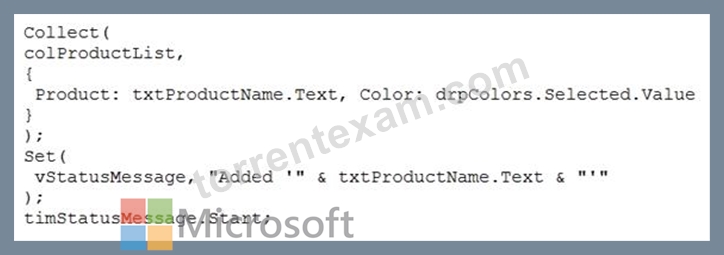
For each of the following statements, select Yes if the statement is true. Otherwise, select No.
NOTE: Each correct selection is worth one point.
Answer:
Explanation:
Reference:
https://docs.microsoft.com/en-us/powerapps/maker/canvas-apps/functions/function-clear-collect-clearcollect
https://docs.microsoft.com/en-us/powerapps/maker/canvas-apps/functions/function-set
NEW QUESTION 43
You create a canvas app that connects to a Common Data Service database.
Users report that they do not see any data in the app.
You need to ensure that users can view data in the app.
What should you do?
- A. Add a Power Apps license to the users
- B. Assign a security role to the users
- C. Publish the app
- D. Share the app with the users
Answer: B
Explanation:
Sharing access to the data in the Common Data Service. The users need permission to access the entities the app uses. To grant them access, you will need to:
1. Create a security role
2. Assign users to the security role
Note: Common Data Service for Apps has a powerful enterprise grade security model that allows you to group users in security roles and give those roles varying levels of access to entities that some of our most sophisticated business apps are built on.
Reference:
https://powerapps.microsoft.com/en-us/blog/sharing-a-canvas-app-built-on-top-of-common-data-service/ D18912E1457D5D1DDCBD40AB3BF70D5D
NEW QUESTION 44
You need to create the solution assets.
What should you use to create the visualizations? To answer, select the appropriate options in the answer area.
NOTE: Each correct selection is worth one point.
Answer:
Explanation:
Reference:
https://docs.microsoft.com/en-us/power-bi/fundamentals/service-service-vs-desktop
NEW QUESTION 45
A company uses Microsoft platforms for all accessibility, compliance, and security auditing.
The auditing and compliance division of the company flags a newly created Power Apps canvas app due to accessibility issues. The app must be unpublished until it conforms to Microsoft accessibility requirements and recommendations.
You need to identify all accessibility issues for a solution.
What should you use?
- A. Microsoft Visual Studio
- B. Microsoft Accessibility Guides
- C. Power Apps Studio
- D. Microsoft Accessibility Conformance Reports
- E. Microsoft Compliance Center
Answer: C
Explanation:
Find accessibility issues
In the upper-right corner of Power Apps Studio, select the icon for the App checker.
App checker icon.
In the menu that appears, select Accessibility.
A list of issues appears, sorted first by severity and then by screen.
Select the arrow next to an item to show details about it.
Accessibility checker details.
Select the back arrow to return to the list of items.
If you decide to address an issue, select it to open the affected property.
After you change one or more properties, select Re-check to update the list of issues.
Resolved items disappear from the list, and new items may appear.
Reference:
https://docs.microsoft.com/en-us/powerapps/maker/canvas-apps/accessibility-checker
https://support.microsoft.com/en-us/accessibility/enterprise-answer-desk
NEW QUESTION 46
You need to configure the system to meet the requirements.
What should you use? To answer, select the appropriate options in the answer area.
NOTE: Each correct selection is worth one point.
Answer:
Explanation:
Reference:
https://docs.microsoft.com/en-us/powerapps/maker/common-data-service/types-of-entities
NEW QUESTION 47
You publish the first version of the app and solution on November 1, 2020.
You need to create the version numbers for the app and the solution.
Which version numbers should you use? To answer, select the appropriate options in the answer area.
NOTE: Each correct selection is worth one point.
Answer:
Explanation:
Explanation:
Box 1: 1.0.0.0
When identifying versions of the app solution, all dependencies, entities, and user interfaces components must be identified to avoid any unintentional issues caused by reverting individual components to a previous version.
A solution's version has the following format: major.minor.build.revision. An update must have a higher major, minor, build or revision number than the parent solution. For example, for a base solution version 3.1.5.7, a small update could be a version 3.1.5.8 or a slightly more signficant update could have version 3.1.7.0. A substantially more significant update could be version 3.2.0.0.
Box 2: 20.11.1.1
Scenario:
* You must use the following version control numbering scheme:
- Major: The last two digits of the year the app is packaged
- Minor: Two digits that represent the month when the app is packaged
- Build: A number that is incremented to represent significant changes to the app
- Revision: The incremented revision for a package
New versions of the application must completely replace previous versions of the app.
Reference:
https://docs.microsoft.com/en-us/powerapps/maker/common-data-service/update-solutions
Topic 2, Contoso, Ltd
This is a case study. Case studies are not timed separately. You can use as much exam time as you would like to complete each case. However, there may be additional case studies and sections on this exam. You must manage your time to ensure that you are able to complete all questions included on this exam in the time provided.
To answer the questions included in a case study, you will need to reference information that is provided in the case study. Case studies might contain exhibits and other resources that provide more information about the scenario that is described in the case study. Each question is independent of the other questions in this case study.
At the end of this case study, a review screen will appear. This screen allows you to review your answers and to make changes before you move to the next section of the exam. After you begin a new section, you cannot return to this section.
To start the case study
To display the first question in this case study, click the Next button. Use the buttons in the left pane to explore the content of the case study before you answer the questions. Clicking these buttons displays information such as business requirements, existing environment, and problem statements. When you are ready to answer a question, click the Question button to return to the question.
Background
Current environment Overview
Operations for the company are managed very informally. Only a small number of long-term employees are aware of all manufacturing processes.
Accounting system and purchasing
* The company has a cloud-based ERP/accounting system and uses the General Ledger, Accounts Receivable, and Accounts Payable modules. The current system does not have any modules that handle shop floor or manufacturing planning functionality.
* Employee information is maintained only within the accounting system. Access to the information is strictly controlled due to privacy regulations and company policies.
* All purchasing of raw materials is performed based on bills of material (BOMs) generated by the engineering department when engineering prints are created.
* The corporate office uses Dynamics 365 Finance. The operations manager reports that Dynamics 365 Finance will not be implemented for the manufacturing plants for at least five years.
Manufacturing and planning
* The plant that Contoso, Ltd. acquires uses Microsoft Excel workbooks and Microsoft Word documents to track the sales pipeline, requests for quote responses, and work estimates. The documents are stored on shared network drives.
* Printed engineering drawings are sometimes accidently used across orders. This results in rework, cost over runs, and missed deliveries.
* The company uses Job Traveler documents to detail the operations that need to be performed and the materials needed for a given job number.
Sales
* Requests for quotes are currently stored in a Sales Log workbook. The workbook includes the following information:
* Customer request number
* Customer name
* Description
* Estimated value of the sale
* Status of the Request for Quote (RFQ) with the values of Won, Lost, No Bid, and Cancelled
* Names of the sales manager, salesperson, and estimator
* Name of the product line
* Date the quote was sent to the customer
* Approximate start and finish dates of the project
* Date the order was received, if won
* Job number, which is assigned if won
* The company has a formal process in place for managing estimates. Some sales quotes lack required supporting documentation including estimates for labor and materials even though a formal process is in place. The company wants to incorporate the formal process as part of an app.
* Salespeople often do not set status of RFQs in the Sales Log to Won when a sale is closed and the customer purchase order is received.
* An accurate sales pipeline and win/loss information cannot currently be reported because the close probability field in the Sales Log is being set to 100% when a sale is closed and 0% when a sale is lost.
* Setting up a folder system on the network drive by a customer had not improved the hand-off of the current version of the sales quote to manufacturing.
Requirements
Solution
You plan to create a solution that uses Microsoft Teams and Power Platform.
You must convert the Sales Log workbook to a Common Data Service database.
Each department will have a separate Teams channel. Employees must only be able to access the channel for their department. All employees and management will have read access to a general company channel. The Teams site must include the following channels:
Sales
* The Sales dashboard must reside in the Sales channel and must include information about active quotes, sales pipeline, and year-to-date sales KPIs for sales quotas by region.
* All Sales-related documents must be stored in folders in the files location for this channel. Document versioning will be enabled. You must store the 10 most recent versions of a document.
Manufacturing
* A dashboard that shows a capacity Heat map by month as well as expected sales that are likely to close for the next month.
* A sortable listing of all in-process jobs from the Job Setup table, by customer, start date, and product.
* Printed paper drawings must no longer be used. The drawings must be stored in folders in the files location for the manufacturing channel.
General
You must create the following apps:
Time Tracking
You must create a canvas app to track time for each employee on mobile devices. The app must include the following:
* a Sign-in screen
* a screen to list the week's time entries for the employee
* a screen to edit current time entries for the employee
The app must meet the following requirements:
* The app must store its data in the existing on-premises Microsoft SQL Server instance.
* Employees must only be able to access their own time tracking records from the app.
* Employees must record all time spent in the fabrication of each customer job.
* Employees must only be able to modify time records for the current and previous day.
* Employees must be able to scan their badges to check in and out of work. Each badge contains the employee name and a current picture.
* A QR code must be added to all employee badges. The code must include the employee's number.
* Job Traveler documents must be printed as PDF documents and must include UPC E barcodes for the job number and task number. The barcodes will be used with the time tracking application.
Sales
The Sales app must meet the following requirements:
* Provide a central location for all sales pipeline and quote information that is easily accessible and maintains all of the versions of the estimate, quote, and engineering documents.
* Include a dashboard that shows all currently active quotes, their status in the sales cycle, the probability of closing, and estimated manufacturing and installation dates, by customer, product division, status, and salesperson.
* The Sales Log app must enforce process standards related to the completion of estimates and supporting materials needed during the sales lifecycle.
* Automatically perform the following actions immediately when a sale is won:
* Generate a sequential job number.
* Copy key sales information to the Job Setup entity used by manufacturing.
* If the sale is lost, the Status field must be set to Lost and the reason for the loss must be entered into a provided text field. The reason must be added to the end of the description field.
* Ensure that employees can easily update the Sales Log even if they are at a customer site.
Manufacturing and planning
The app must meet the following requirements:
* Provides features to plan and predict capacity resource requirements for current and upcoming orders in the pipeline.
* Replace paper timesheets and track check-in, check-out, breaks, and the time spent on each job task.
* Record time elapsed while performing work and for viewing of engineering drawings.
* The Job Setup entity must store its data in the existing on-premises SQL Server instance.
* Job Traveler documents must be generated as a PDF document and printed from the Job Setup entity.
Issues
* Uses report that the customer request number is difficult to interpret. They request that you change the number to a system generated sequential number.
* The operations manager reports that users often incorrectly sign in to the time tracking app. The operations manager asks that the time tracking app display the employee's photo once they have scanned their badge.
* Users want to be able to see their weekly total time entered from all screens.
* Testers report that they can see time entries in the Time Tracker app, not just their own. Additionally, they can also edit any existing time entries.
NEW QUESTION 48
You create a canvas app.
A user is not able to determine which field currently has focus. You run App checker to identify errors.
You need to verify that the focused border thickness is set to a value greater than zero.
Which section of the App checker results should you check?
- A. Runtime
- B. Performance
- C. Accessibility
- D. Rules
Answer: C
Explanation:
The Accessibility checker classifies each issue as an error, a warning, or a tip based the issue's severity.
Issues include:
* Focus isn't showing
When the FocusBorderThickness of a control is set to 0. It is good practice to ensure a proper color-contrast ratio between the focus border and the control itself so it's clearly visible.
Reference:
https://docs.microsoft.com/en-us/powerapps/maker/canvas-apps/accessibility-checker
NEW QUESTION 49
You need to ensure that the app can support the needs of User2 and User3, and meets the production deployment requirements.
Which tools should you use? To answer, select the appropriate tool in the answer area.
NOTE: Each correct selection is worth one point.
Answer:
Explanation:
Explanation:
Box 1: App Checker
Scenario: Several sales representatives have accessibility restrictions. User2 is visually impaired and cannot see images. User3 is unable to use a mouse.
Users who have vision, hearing, or other impairments can use your canvas app more easily and successfully if you consider accessibility as you design how the app looks and behaves. If you're not sure how to make your app more accessible, you can run the AppChecker Accessibility checker in Power Apps Studio.
Box 2: Solution Checker
Scenario: Before deploying the app to production, you must ensure that the app conforms to Microsoft accessibility and performance guidelines.
Use solution checker to validate your model-driven apps in Power Apps.
Reference:
https://docs.microsoft.com/en-us/powerapps/maker/canvas-apps/accessibility-checker
https://docs.microsoft.com/en-us/powerapps/maker/common-data-service/use-powerapps-checker
NEW QUESTION 50
You need to resolve the issue for User1.
What should you use? To answer, select the appropriate options in the answer area.
NOTE: Each correct selection is worth one point.
Answer:
Explanation:
Reference:
https://powerapps.microsoft.com/en-us/blog/implementing-offline-capability-in-your-app/
NEW QUESTION 51
A company creates a Power Apps app that allows service representatives to record information about on-site client visits. Service representatives perform a one-hour site visit with each client each quarter.
Service representatives use the app to perform the following activities:
View their scheduled visits for the day.
Record notes from service visits.
Schedule service technicians for issues uncovered during site visits.
Scan and upload service quote forms to a folder named Service Quote folder on Microsoft OneDrive once the customer has signed a service quote.
Service quotes that are over $10,000 are automatically sent to the service manager for review and approval.
Visits that are not closed at the end of the day are automatically moved to the following day unless it is the last day of the quarter. All client visits not performed for the quarter are escalated to the service manager for follow-up.
You need to create flows to meet the requirements.
Which type of flows should you use? To answer, select the appropriate options in the answer area.
NOTE: Each correct selection is worth one point.
Answer:
Explanation:
Reference:
https://docs.microsoft.com/en-us/power-automate/overview-adaptive-cards
https://docs.microsoft.com/en-us/power-automate/button-flow-with-user-input-tokens
NEW QUESTION 52
You have a Power Platform solution that uses Common Data Service.
You need to secure all fields that support field-level security.
Which field can you secure?
- A. owninguser
- B. cr7b_accountid
- C. accountid
- D. createdon
Answer: B
Explanation:
Which fields can be secured?
Although most attributes can be secured, there are system attributes, such as IDs, timestamps, and record tracking attributes, that can't. Below are a few examples of attributes that can't be enabled for field security.
ownerid, processid, stageid, accountid, contactid
createdby, modifiedby, OwningTeam, OwningUser
createdon, EntityImage_Timestamp, modifiedon, OnHoldTime, overriddencreatedon statecode, statuscode Reference:
https://docs.microsoft.com/en-us/power-platform/admin/field-level-security
NEW QUESTION 53
You are creating a Power Automate flow.
You have an array that contains items with different color attributes. You plan to filter the array by using the following filter expression within the flow:
@or(equals(item()?['color'], 'red'),contains(item()?['color'],'blue'))
The filter returns results only when the expression resolves to true.
For each of the following statements, select Yes if the statement is true. Otherwise, select No.
NOTE: Each correct selection is worth one point.
Answer:
Explanation:
NEW QUESTION 54
You need to create a model-driven app without using code.
Which tools should you use? To answer, select the appropriate options in the answer area.
NOTE: Each correct selection is worth one point.
Answer:
Explanation:
Reference:
https://docs.microsoft.com/en-us/powerapps/maker/model-driven-apps/create-edit-views-app-designer
https://docs.microsoft.com/en-us/powerapps/maker/model-driven-apps/create-site-map-app
NEW QUESTION 55
You are using Test Studio to test a Power Apps canvas app.
You need to ensure that the app conforms to several use cases.
What should you do first?
- A. Save the app to your computer.
- B. Create a test suite.
- C. Create test cases for each requirement.
- D. Record test cases for each requirement.
- E. Save the app to the cloud.
Answer: B
Explanation:
Create a test suite.
By default, a test suite and test case are created for you in Test Studio. Test suites are used to organize your test cases.
Reference:
https://docs.microsoft.com/en-us/powerapps/maker/canvas-apps/working-with-test-studio
NEW QUESTION 56
You are configuring security to enable users to analyze data by using Microsoft Excel templates.
You create a security role named TemplateAdministrator and configure the role as shown below and assign the role to a user named User1.
Use the drop-down menus to select the answer choice that answers each question based on the information presented in the graphic.
NOTE: Each correct selection is worth one point.
Answer:
Explanation:
NEW QUESTION 57
......
Latest PL-100 Pass Guaranteed Exam Dumps Certification Sample Questions: https://www.torrentexam.com/PL-100-exam-latest-torrent.html
PL-100 Updated Exam Dumps [2021] Practice Valid Exam Dumps Question: https://drive.google.com/open?id=1BU-5dx4quoHLx_E330h4B8gsMKBH8FpX
